
Choose ready-made software when the way you work is close to how most companies in your sector work and you need to start quickly on a small upfront budget. Choose a custom-built system when the way you work is itself what sets you apart, or when the ready-made tool forces your team to work around it with spreadsheets and repeated workarounds instead of working in it. Many companies end up with the best fit by combining the two: a ready-made core for the standard work and a custom layer for what is theirs alone.
This guide compares both options in one table covering cost, time to launch, ownership, scaling and vendor lock-in. It then shows the signs that point to each option, gives you a seven-question decision checklist, and explains how we handle this decision with clients at HBS.
What is the difference between building a custom system and buying ready-made software?
Ready-made software (often called off-the-shelf) is one product that a vendor sells to many companies in the same form, usually as a monthly or yearly subscription per user, or as a one-time licence with support fees. You adapt to the way it works, and the vendor decides what gets added, what changes and when.
A custom system is built around the way you work: your sales stages as they really happen, your approvals as your management signs them off, and the reports your managers actually read. You pay to build it once, then pay for hosting, maintenance and further development, and you own the code, the data and the product decisions, as far as your contract says so.
Between the two sits a common third option: configurable ready-made software such as Odoo or Zoho, extended with custom modules or a custom layer that connects to it. In this article we call that the hybrid approach.
How do the two options compare on cost, time to launch and ownership?
The clearest difference is not the price. It is the shape of the cost and who controls the system. This table sums up the comparison on the criteria that usually decide it:
| Criterion | Ready-made software | Custom-built system |
|---|---|---|
| Cost profile | Low entry cost, then a recurring subscription that grows with every new user | Higher build cost upfront, then hosting and maintenance with no per-user fees |
| Time to launch | Faster: the features exist and need setup and training | Longer: the system is designed, built and tested before go-live |
| Fit with your processes | You adapt to the software | The system adapts to how you work |
| Ownership | You own the right to use it; the vendor owns the code | You own the code and data if the contract says so |
| Scaling | Easy while you stay within the plan and its features | Grows in the direction you need, with development cost for each addition |
| Vendor lock-in | Higher: pricing, roadmap and data-export terms are set by the vendor | Lower if you receive the code, documentation and server access; otherwise the lock-in moves to your development partner |
| Updates and maintenance | Handled by the vendor for every customer at once | Your responsibility with your development partner, under a clear support contract |
| Integration with your other systems | Limited to the integrations and APIs the vendor offers | Built to your needs, such as e-invoicing and local payment gateways |
The table does not make the decision on its own, because the balance shifts with your own numbers: how many users, how much customisation, and how long you will stay on the system. For a worked example of total cost over three years, see our guide to custom ERP and CRM development cost.
When is ready-made software the smarter choice?
Ready-made software is the right call for most standard functions that do not set you apart from your competitors. Choose it if most of these apply to you:
- Your processes are standard for your sector. General accounting, payroll, email and task management work in much the same way at most companies, and ready-made tools serve them well.
- You need to start within weeks. Ready-made software runs after setup and training, with no build phase to wait for.
- Your team is small and growth is limited. A subscription for a few users is usually cheaper than building and maintaining a system.
- You will use the features as they are. If your list of changes is short, there is no point paying to build what already exists.
- Nobody inside the company will own the system. A custom system needs a decision-maker who follows development and sets priorities. Ready-made software carries part of that load for you.
Before you sign, test the software on one real process from your daily work with your actual data, not on the vendor's demo. Check the quality of the Arabic interface and Arabic reports, whether you can export all of your data, and whether it supports the local connections you need, such as integration with Egypt's e-invoicing system if your company is required to use it.
When is building a custom system worth it for your company?
A custom system is worth it when the gap between how you work and how the software works costs you something every day. These are the clearest signs:
- Your way of working is your competitive edge. A long sales cycle with quotes in several versions, after-sales service tied to every unit you sold, or special pricing for each client. If the software forces you to simplify that, you lose what sets you apart.
- Your team works around the software instead of in it. Spreadsheets next to the system, data copied by hand between tools, and reports exported and rebuilt every week.
- Subscriptions grow faster than the value. Every new hire means a new licence, and every feature you need sits in a higher plan.
- You need a connection the software does not support. Such as e-invoicing, local payment gateways, WhatsApp, or an old system that still holds your data.
- Your data is sensitive and you want full control of it. Where it is stored, who can reach it, and how every action on it is logged.
- The system is itself a product you will sell. If you are building a platform for your own customers, it should not rest on software you do not own.
A custom system does not fix everything by itself, though. It needs clearly written requirements, a decision-maker inside your company, and a budget for maintenance and development after launch, not only for the build. And if you decide to build, choosing who builds it matters as much as the decision itself. Our eight criteria for choosing a software development partner will help.
Can you combine ready-made software with a custom system?
Yes, and in many cases it is the most realistic option. You keep the ready-made software for what it does well, such as accounting, and build a layer on top of it or next to it for what sets you apart: a portal for your clients, an internal approval flow, or a dashboard that brings data from several systems into one screen. The two layers connect through APIs, so data moves between them without copying by hand.
The success of this approach depends on the quality of the integration more than anything else. So before you build on a ready-made product, make sure it offers a documented, stable API, and know what will happen if the vendor changes that API or raises its prices. If you have not yet decided which type of system you need in the first place, start with our article on CRM vs ERP.
Which questions settle the decision before you pay?
Get the people responsible for the process into one meeting and answer these questions in writing:
- Does the way we run this process really differ from what is standard in our sector? And is that difference a source of profit, or a habit we could change?
- How many people will use the system today, and in three years? And how does the price of the ready-made software change as that number grows?
- Which systems must it connect to? Accounting, e-invoicing, payment gateways, the online store, WhatsApp. Does the ready-made software actually support them, or only promise to?
- Can we export all our data if we decide to leave? In what format, and does that include attachments and older records?
- Do the interface and reports work in Arabic the way our team needs? From text direction to names, addresses and printed invoices.
- Who inside the company will own this system? One person who sets priorities, approves changes and follows adoption.
- Do we have a budget for after launch? Maintenance, security updates and continued development, whether we pay for it as a subscription or as a support contract.
If your answers to the first three questions lean towards "different", "many" and "not supported", a custom system or a hybrid approach deserves serious study. If they lean towards "standard", "few" and "supported", start with ready-made software and save the build budget for what truly sets you apart.
What are the common mistakes when choosing between ready-made and custom?
- Comparing first-year prices only. A subscription that looks cheap today can become the biggest line in the budget once the team grows.
- Building everything from scratch. There is no need to program general accounting or an email system when ready-made tools do it well. Build only what sets you apart.
- Customising ready-made software until it loses its advantages. The more deep changes you make to a ready-made product, the harder it becomes to upgrade, and you may end up paying the subscription plus development on top.
- Choosing from the feature list. A demo shows what the software can do, not what your team will do with it every day.
- Having no exit plan. Before any contract, know how you would leave: by exporting your data from the ready-made software, or by receiving the code and documentation from your development partner.
How does HBS approach the build-or-buy decision?
At HBS we start from the way you work, not from the technology. We review your processes as they actually run, the systems you use today, the integrations you need and the e-invoicing requirements in your country. Then we recommend the option that fits, whether that is ready-made software, a custom system or a hybrid, and we say so plainly, even when the answer is that you do not need to build anything right now.
An example from our work: Labib Demian Youssef & Co. (LDY CO) has equipped laboratories in Egypt since 1962 as the authorised agent for 12 global instrument brands. It was running on an off-the-shelf system that treated sales as a simple pipeline, while its real work is a long consultative sales cycle, quotes in several versions, then installation, warranty, maintenance contracts, calibration and operator training. The gap between how the software worked and how the company worked was big enough to justify building a custom system.
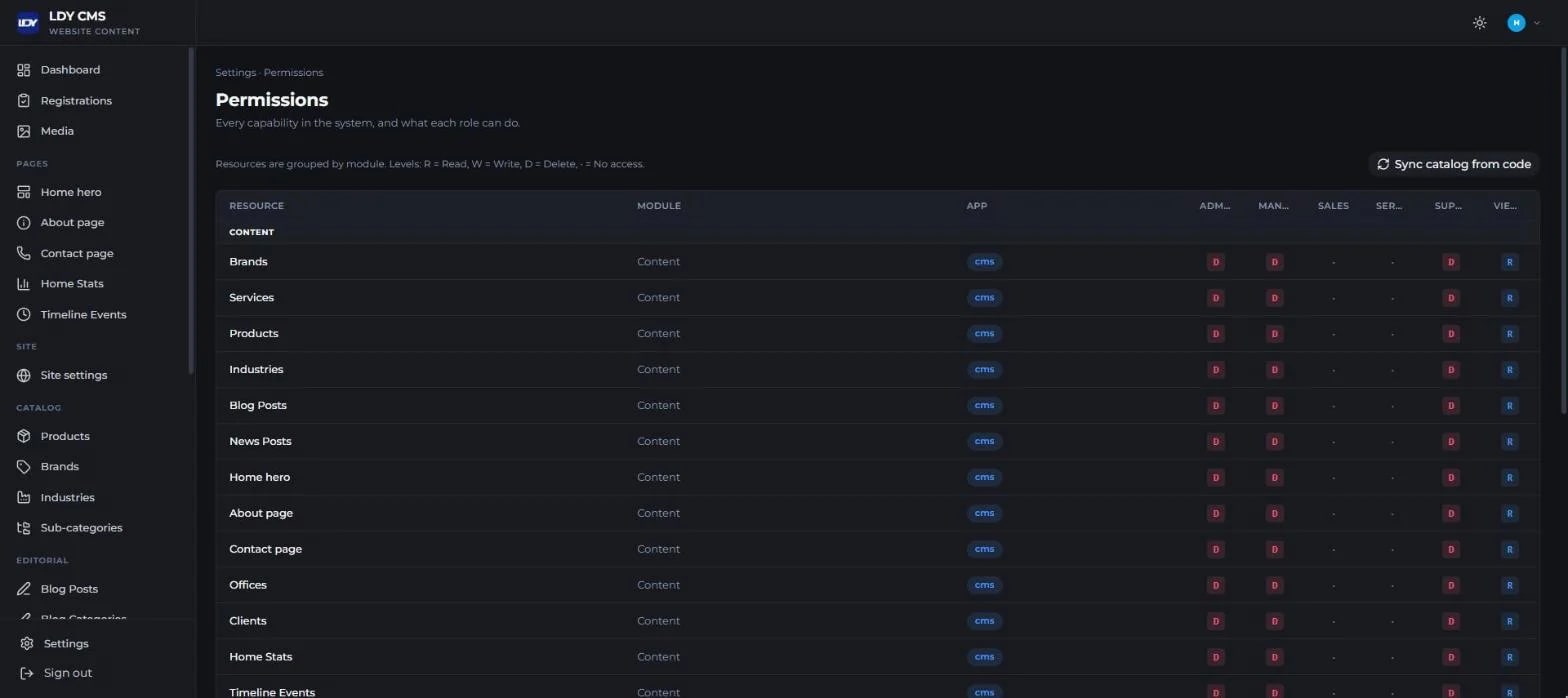
So we built LDY CMS: one dashboard for sales, service and marketing, with a sales pipeline that follows LDY's real sales stages, a quote builder that handles discounts and VAT, an after-sales section that links every installed instrument to its account history, and a permissions matrix with a full audit log. And because a new system is worth little if the team does not use it, we trained LDY's team on site and through live webinars, and produced short Arabic video tutorials for every module.
If you are still weighing ready-made software against a custom system, tell us how your team works today and which systems you use. We will sit down with you in a free discovery session and tell you honestly which option fits, and you can learn more about HBS custom business software development.